
For landlords & property managers
Property management system for landlords and agents
Keep your properties, tenants, rent and repairs in one account. Invoices go out on time, payments are matched to them, and you can see who owes what without opening a spreadsheet.
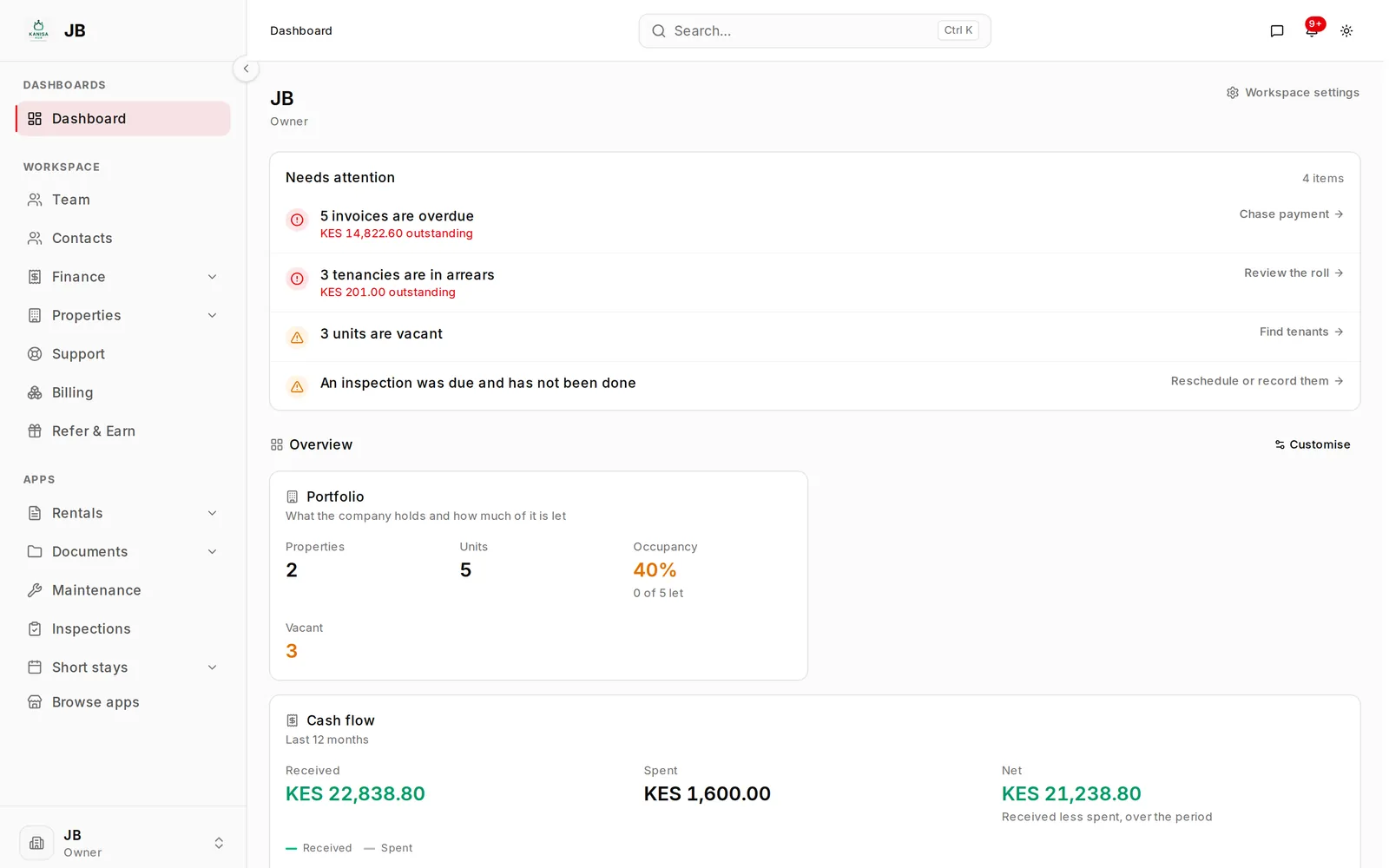
At a glance
PropertyView in short
| What it is | A property management system: properties, tenants, leases, rent, repairs and accounts in one account, with a public site to list vacant units. |
|---|---|
| Built for | Landlords, letting agents and property managers, from a few units to several hundred. |
| Where | Kenya. Prices are in Kenyan shillings, and the tax figures follow KRA rules. |
| Pricing | A free plan to start. Paid plans are monthly and go up with the number of properties, units and staff. |
| Payments | Tenants pay by M-Pesa or card into the payment account you connect. Cash and bank deposits are recorded by hand. |
| Getting started | Sign up and add your first property yourself in a few minutes. Larger portfolios import from an Excel workbook. |
| Apps | Rentals, Maintenance, Short stays, Inspections, Documents, Notice board and Parking, turned on when you need them. |
| Where it runs | In the browser on a phone or a computer. Tenants and owners get logins of their own. |
What it does
The monthly work of letting property, in one place
Rent collection and arrears
See who has paid and who hasn't
Each lease has a rent schedule, and the invoices are raised from it every month. Payments are recorded against the invoice they settle, so every tenant's balance stays current. Tenants get reminders by email, SMS or in their portal.
How Rentals works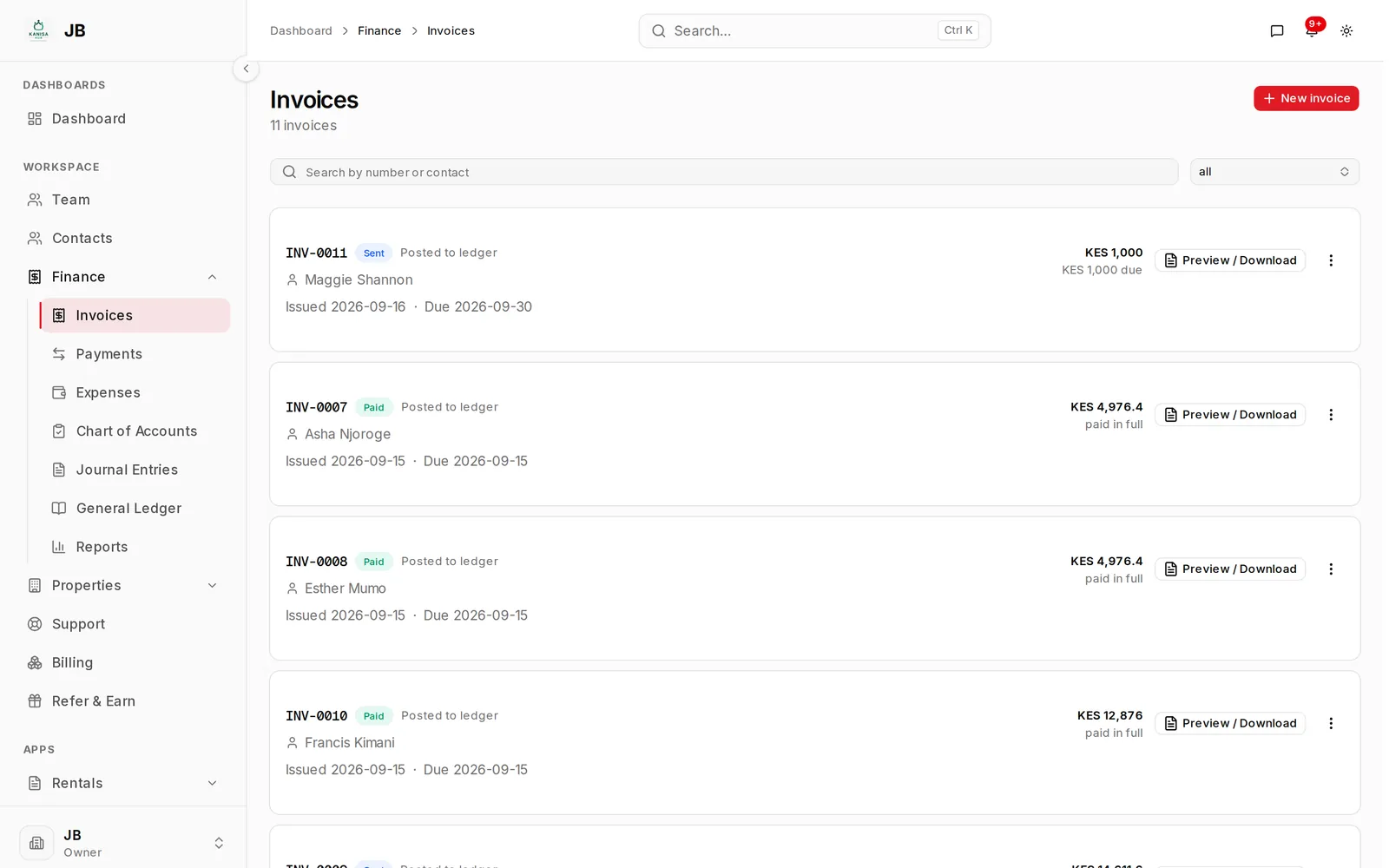
Tenants
Everything about a tenant on one page
Their leases, deposit, balance, every invoice and payment, and their contact details. When a tenant gives notice, you agree the deposit deductions with them and the refund goes straight into your accounts.
How Rentals works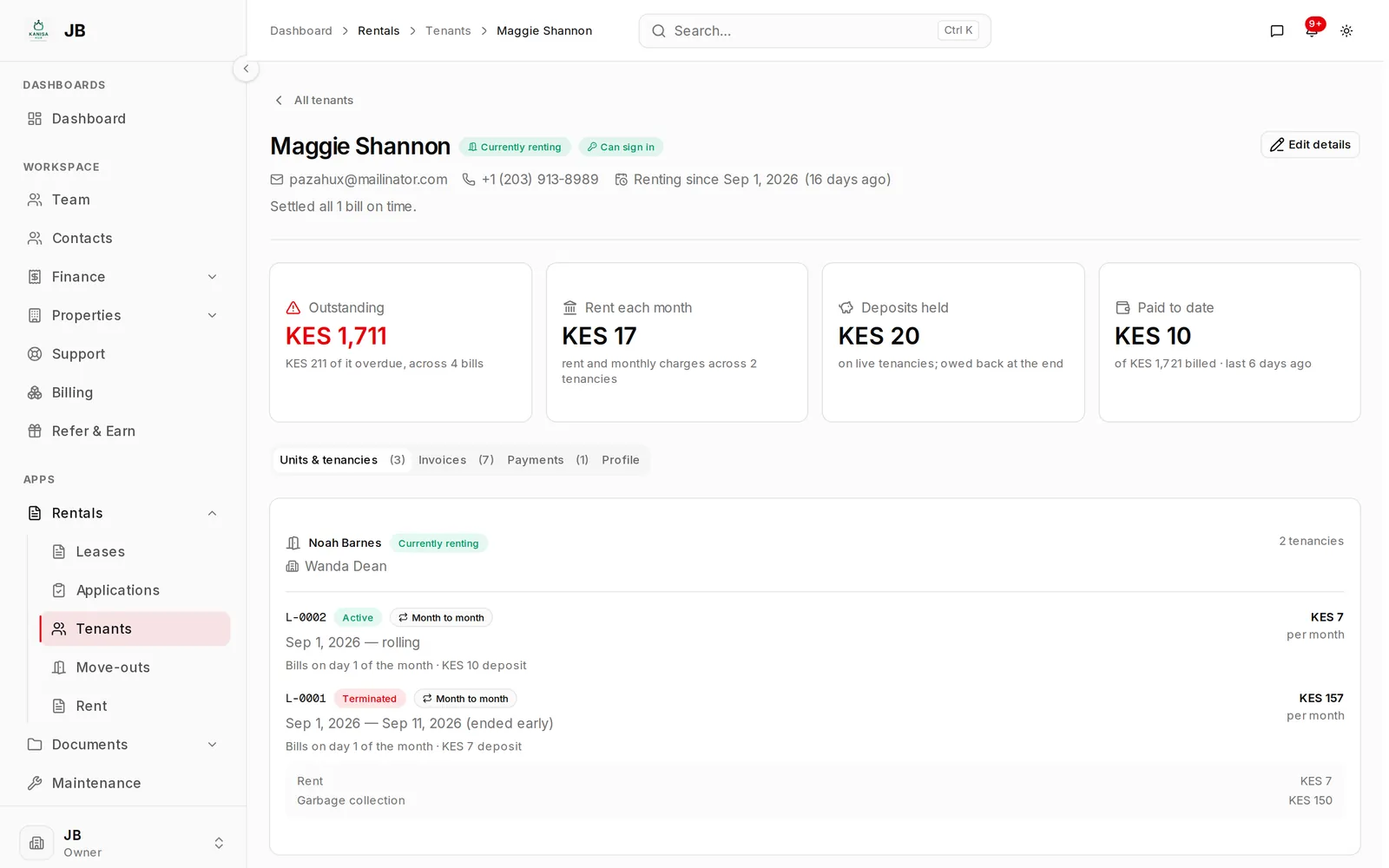
Repairs
Repairs that don't get lost
Tenants report a problem from their portal, or your staff log it for them. Move each job across a board as the work gets done, require approval before costly work starts, and record what it cost against the property.
How Maintenance worksAccounts
Books you can hand to your accountant
Payments and expenses post to a proper set of accounts as they happen. Run an income statement, balance sheet, aged receivables or profit by property, and download it as PDF, Excel or CSV.
How the accounts work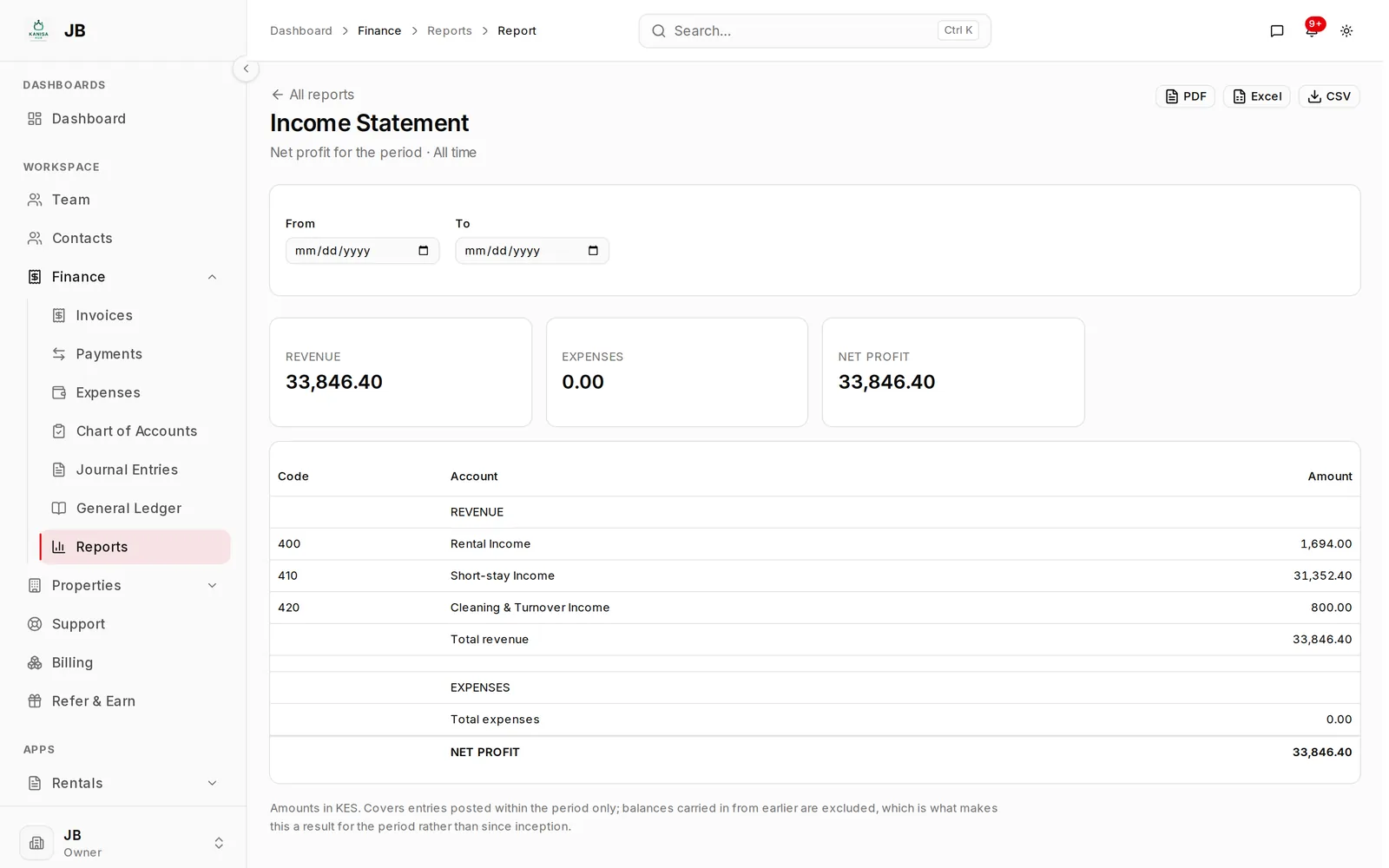
Also included
And the rest of the job
-
Free listings
Vacant units go on the PropertyView directory with photos and price, and renters can apply online.
-
Tenant portal
Tenants see their invoices and receipts, pay online and report repairs from their own login.
-
Staff access
Caretakers and accountants get their own login. Limit what each one sees, down to specific properties.
-
Short stays
Let units by the night alongside your long leases, on one calendar, so nothing is double-booked.
-
Inspections and documents
Move-in, move-out and routine inspections with photos, and leases and IDs stored against the tenant.
-
Notice board
Post notices to the tenants in a building, and print a QR code for the lobby that opens them.
Works with
Connects to the accounts you already use
-
M-Pesa
Tenants pay from the prompt on their phone to your paybill or till, and each payment is matched to its invoice.
-
Cards and banks
KCB, Paystack, Flutterwave and Stripe, connected with your own merchant account.
-
Owner payouts
Pay owners to M-Pesa, a paybill or till, or a bank account, with approvals before money leaves.
-
Excel
Import properties, tenants, leases and balances from one workbook. Export any report to PDF, Excel or CSV.
-
Airbnb and Booking.com
Short stays keep booked dates in step with your channels over their calendar links.
-
KRA returns
Monthly rental income tax, VAT and withholding figures from your records, ready to enter on iTax.
Getting started
How to get started
- 1
Add your properties
Enter your buildings and units. Add photos if you want to advertise the vacant ones.
- 2
Add tenants and leases
Record who lives where, their rent and their deposit, then invite them to their portal.
- 3
Let the invoices run
Rent invoices and reminders go out each month. Record payments as they come in, or let tenants pay online.
- 4
Check the numbers
See arrears, income and expenses for each property whenever you need them.
Who uses it
Whether you own three units or manage three hundred
Landlords with a few units
Start small and keep everything about your tenants in one place. Move to a bigger plan only when your portfolio grows.
Letting agents and managers
Run properties for several owners from one login. Each owner's portfolio keeps its own accounts.
Teams with staff on site
Caretakers get their own login and see only the properties and tenants they look after.
Landlords living abroad
Check rent, repairs and spending on your Kenyan property from wherever you live.
Short-stay hosts
Direct bookings and Airbnb calendars, in the same books as your long leases.
Landlords moving off Excel
What changes when your rent spreadsheet stops keeping up.
Security
Who sees what, and a record of who did what
Roles and permissions
Owners, managers, accountants and caretakers each see what their role allows. A caretaker can handle repairs without seeing your accounts.
Limited to their buildings
Staff can be assigned to particular properties and see nothing outside them.
A log that cannot be edited
Every change is recorded with who made it and when. The log sits in a separate database the app can add to but not change or delete.
Safer sign-in
Two-factor codes, passkeys, and a list of signed-in devices you can sign out of.
Approvals on payouts
Payouts to owners can need up to three approvals, and a new payout account waits before it can be paid.
Your records stay yours
Download your reports as PDF, Excel or CSV whenever you need them.
Guides
Guides for landlords in Kenya
-
Rental income tax in Kenya
The 7.5% rate, who pays it, the deadline and how to file on iTax.
-
Rent deposits in Kenya
What the law says, what is usual, and what to put in the agreement.
-
Rent arrears in Kenya
What a landlord can lawfully do about unpaid rent, and what not to.
-
PropertyView vs Nyumba Zetu
How two Kenyan property management systems differ on pricing and features.
Pricing
Pay for the size of your portfolio
Plans go up with the number of properties, units and staff you have. Prices are in Kenyan shillings.
Starter
A small portfolio, three apps
KES 2,500/ month
7-day free trial
Try it free for 7 days- 5 properties
- 25 units
- 3 seats
- 250 contacts
- Includes Documents, Notice Board, Rentals and Short stays
- Up to 3 apps installed
Growth
The one most agencies want
KES 4,500/ month
Choose Growth- 25 properties
- 150 units
- 10 seats
- 2,000 contacts
- Includes Documents, Inspections, Maintenance, Notice Board, Parking, Rentals, Sales and Short stays
- Up to 5 apps installed
Scale
Every app, no ceilings
KES 12,000/ month
Choose Scale- 50 properties
- 400 units
- 50 seats
- Unlimited contacts
- Every app, including new ones as they launch
Questions
Common questions
What is PropertyView?
A property and rental management system for landlords and letting agents in Kenya. It keeps your properties, tenants, leases, rent invoices, repairs and accounts in one place, and includes a public listings site where you can advertise vacant units.
How much does it cost?
There is a free plan for a small portfolio. Paid plans start at KES 2,500 a month, and cost more as you add properties, units and staff. The pricing page lists every plan and what it includes.
Can tenants pay rent online?
Yes, once you connect a payment method in your settings. Each payment is matched to its invoice and recorded in your accounts. You can also record cash and bank payments yourself.
Can staff use it without seeing the money?
Yes. Each role has its own permissions, so a caretaker can look after tenants and repairs without seeing your accounts. You can also limit someone to the properties they look after.
Do I have to use every app?
No. Properties, contacts, invoicing and accounts are core modules that every account has. Rentals, Maintenance, Short stays, Inspections, Documents and Notice board are apps you turn on when you need them, and turning one off hides it without deleting its records.
I manage properties for other owners. Does that work?
Yes. Each owner's portfolio can be its own company with its own accounts, and you switch between them from one login. Each company has its own plan.
Can I bring my records over from Excel?
Yes. Download the import workbook, fill in your properties, tenants, leases and balances, and check a preview before anything is saved. You choose the month you go live from, so nobody is billed again for months that are already settled.
Does it help with rental income tax?
It works out monthly rental income tax from the rent you actually received, not the rent you invoiced, and prepares the figures for each return. You still file on iTax yourself.
Can I see it before I sign up?
Yes. Book a demo and we will walk you through it with a portfolio like yours, or start on the free plan and look around yourself.
Is my data safe?
Each person sees only what their role and assigned properties allow, sign-in supports two-factor codes and passkeys, and every change is kept in a log that cannot be edited.
Try it with one property
Add a building, a unit and a tenant, and see how it fits the way you work. It takes a few minutes.